▶ Watch the lab video on YouTube
Tuesday is circuits night in the Overwatch Engineering Lab. Yesterday I said the plan was a Tinkercad Circuits session with a battery, a resistor, and an LED. That happened, and it didn’t go the way I expected. I worked out the current with Ohm’s law, measured it, and got a much smaller number. This post covers how I figured out why.
Everything here was done in the Tinkercad Circuits simulator, not on a physical bench.
Contents
- The Setup
- The Prediction
- The Measurement
- Finding the Missing Voltage
- Corrected Results
- Where the Voltage Goes
- Multimeter Lessons
- Two Experiments I Kept Separate
- Sidebar: The Potato Plot Twist
- Takeaway
The Setup
- A nominal 3 V CR2032 coin cell
- A breadboard and jumper wires
- A red LED
- A multimeter
- Three resistors, tested one at a time in series with the LED: 220 Ω, 330 Ω, and 1,000 Ω
It’s one loop: battery, resistor, LED, back to the battery.
The Prediction
Ohm’s law is V = I × R. Quick notation note, because I mixed this up out loud: I is current, not impedance. R is resistance. Impedance is usually written Z, and it doesn’t come into a simple DC circuit like this one.
Rearranged for current, I = V / R. I plugged in the full 3 V for each resistor:
- 220 Ω: 3 / 220 ≈ 0.01364 A ≈ 13.64 mA
- 330 Ω: 3 / 330 ≈ 0.00909 A ≈ 9.09 mA
- 1,000 Ω: 3 / 1,000 = 0.00300 A = 3.00 mA
To keep the math on screen during the video, I built a simple whiteboard app with Claude. ChatGPT was my learning assistant during the session.
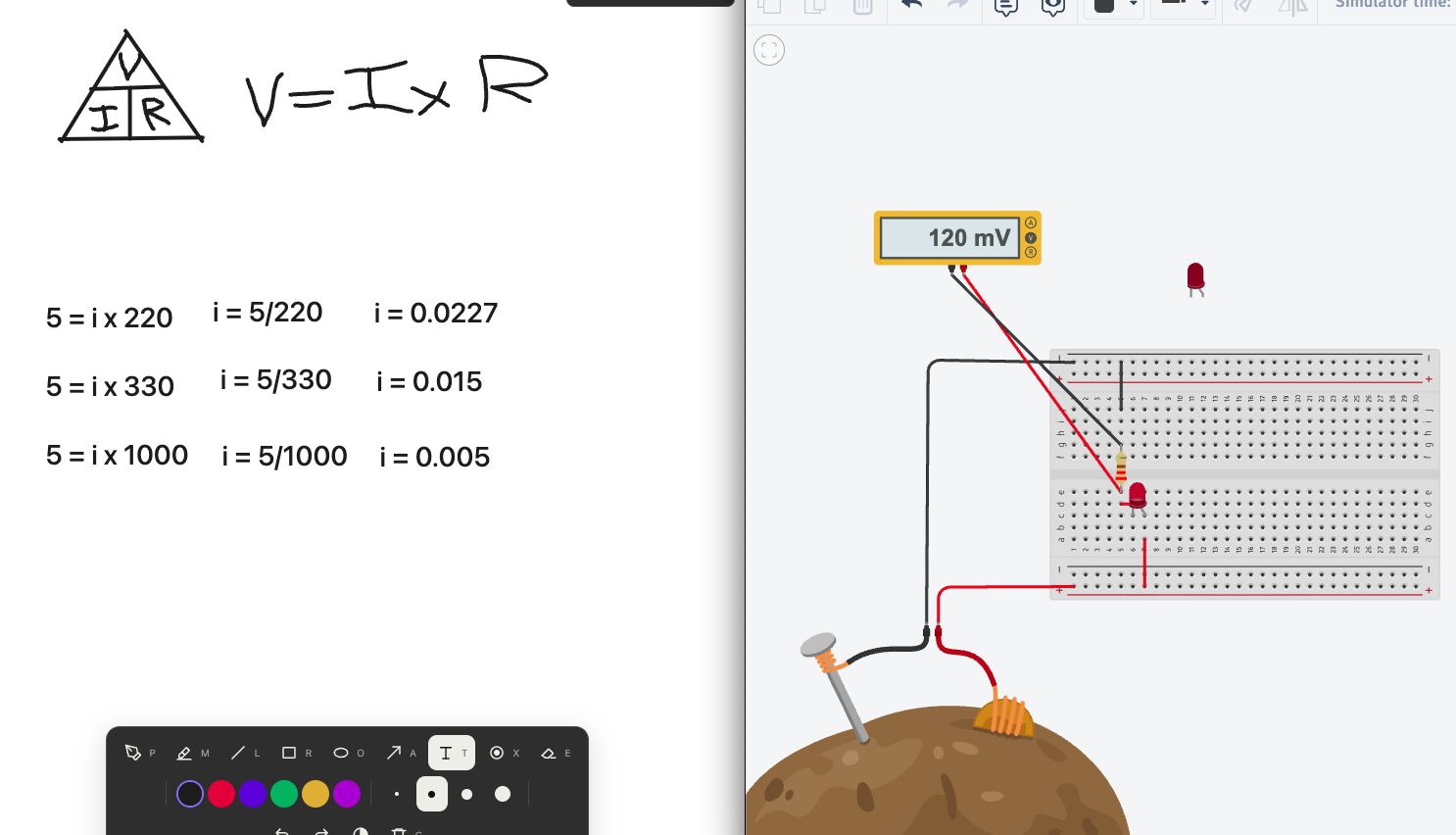 An early version of the whiteboard, from when I was still using the potato battery’s 5 V setting. These estimates were replaced later. More on the potato below.
The Measurement
With the 220 Ω resistor in place, I put the meter in the loop and started the simulation. It showed 4.70 mA, about a third of what I’d predicted.
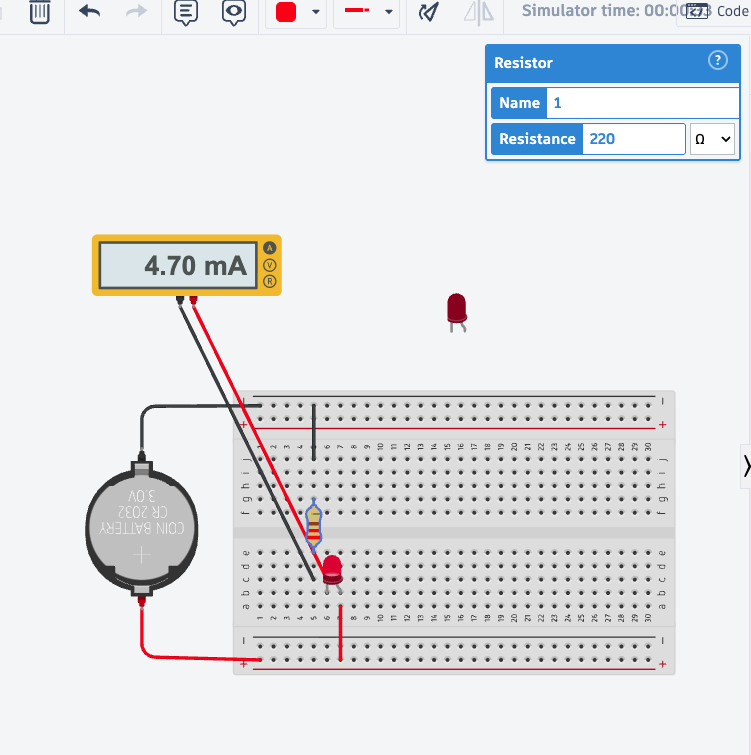 The 220 Ω run: the meter in series reads 4.70 mA.
My first instinct was that I’d wired something wrong. The wiring was fine, though. My mistake was in the math.
Finding the Missing Voltage
Voltage is a potential difference between two points. It isn’t something that flows; current is. So I stopped asking what the current should be and measured the voltage across each part instead.
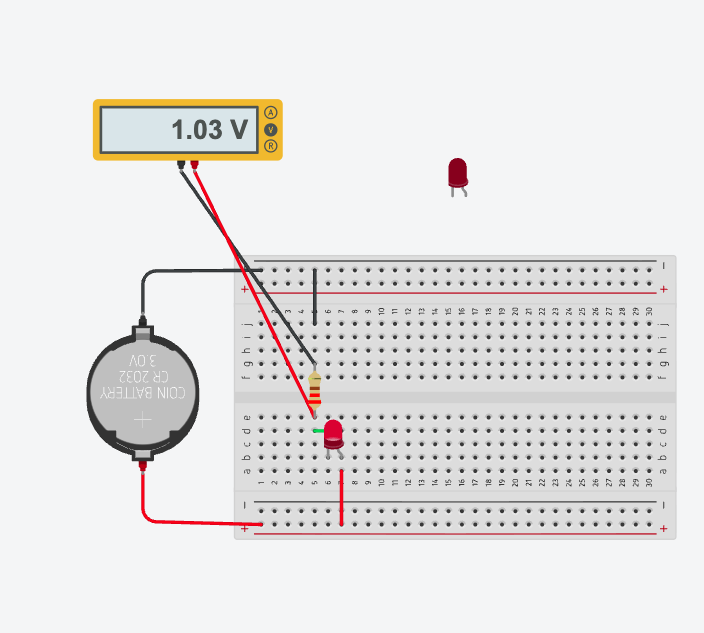 In the 220 Ω setup, the resistor reads 1.03 V.
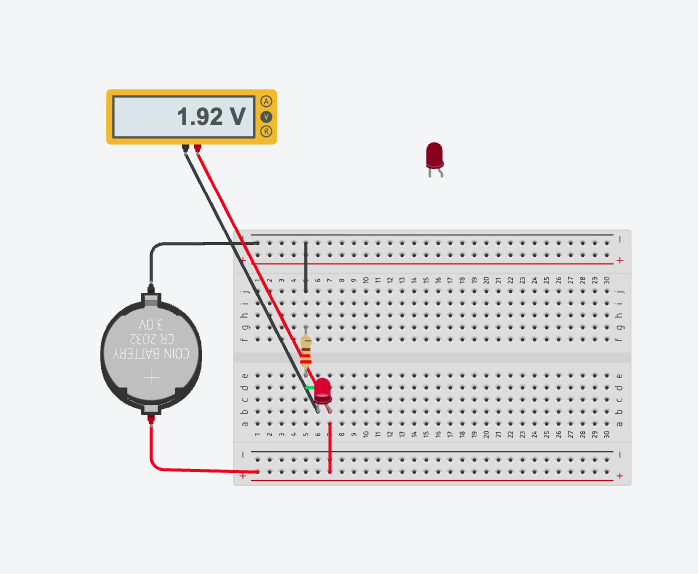 Across the LED in the 220 Ω setup, the reading was 1.92 V.
The resistor wasn’t getting 3 V. It was getting about 1 V, and the LED was taking most of the rest. Ohm’s law was fine. I’d used the wrong voltage for the resistor.
The rule I took away: to use I = V / R on a resistor, use the voltage across that same resistor. And since this is a single series loop, the same current flows through the resistor and the LED. If I know the resistor’s current, I know the LED’s current too.
For 220 Ω, 1.03 V / 220 Ω ≈ 0.0046818 A ≈ 4.68 mA. The meter showed 4.70 mA. Both are fine. The 4.68 mA is calculated from a voltage reading that was rounded to two decimal places, and the 4.70 mA is the meter’s own current measurement. They’re close, but they’re not the same thing.
Corrected Results
I repeated the voltage measurement for each resistor:
| Resistor | First prediction (full 3 V) | Measured resistor voltage | Calculated current (V_R / R) | Meter reading |
|---|---|---|---|---|
| 220 Ω | 13.64 mA | 1.03 V | 1.03 / 220 ≈ 4.68 mA | 4.70 mA |
| 330 Ω | 9.09 mA | 1.08 V | 1.08 / 330 ≈ 3.27 mA | 3.27 mA |
| 1,000 Ω | 3.00 mA | 1.16 V | 1.16 / 1,000 = 1.16 mA | 1.16 mA |
The 220 Ω meter reading is from the screenshot above. The 330 Ω and 1,000 Ω meter readings are what I read out in the recording.
To be fair to my first predictions: they’re right for a resistor alone across an ideal 3 V supply. They just didn’t account for the LED in series.
Where the Voltage Goes
In a simple loop, the battery’s terminal voltage is approximately the resistor’s voltage plus the LED’s voltage.
- 1,000 Ω: LED 1.83 V + resistor 1.16 V = 2.99 V
- 220 Ω: LED about 1.92 V + resistor 1.03 V = 2.95 V
I’m not going to claim the 0.05 V gap in the 220 Ω case is just rounding. I took those readings separately, and I didn’t fully characterize the source or the measurement conditions. It’s close, and that’s as far as I’ll take it.
Two other things stood out:
- The LED’s voltage isn’t fixed. It read about 1.92 V at the higher current and 1.83 V at the lower one. LED forward voltage changes with current, so you can’t subtract one fixed number for every resistor.
- More resistance meant less current, even though the resistor’s voltage went up slightly (1.03 → 1.08 → 1.16 V). As the current dropped, the LED’s share of the voltage dropped a bit, which left a little more for the resistor.
Multimeter Lessons
A lot of the session was just learning to use the meter correctly.
- Voltage: set it to DC volts and put the probes across the component, in parallel, with the circuit complete and powered.
- Current: stop the simulation before rewiring. Remove one jumper in the series path and replace that connection with the meter in amps mode. The current has to go through the meter. When you switch back to measuring voltage, put the jumper back. Never connect an ammeter directly across the battery.
- Resistance: disconnect power and isolate the resistor, then measure across it in ohms mode. I took mine out completely. On real hardware, lifting one lead is usually enough. The simulator has a Start button, but that doesn’t make it OK to measure resistance in a powered real circuit.
Two Experiments I Kept Separate
A. Resistor removed, LED still connected. The meter jumped to 61.9 mA, and the simulator flagged the LED with a warning that this particular LED’s recommended maximum is 20 mA. The current wasn’t infinite, because the source and component models still limited it, but it was well past what the part is meant to handle. That’s the resistor’s whole job here. (I only did this in simulation, and I wouldn’t do it on hardware. Also, 20 mA was this LED’s rating, not a number that applies to every LED.)
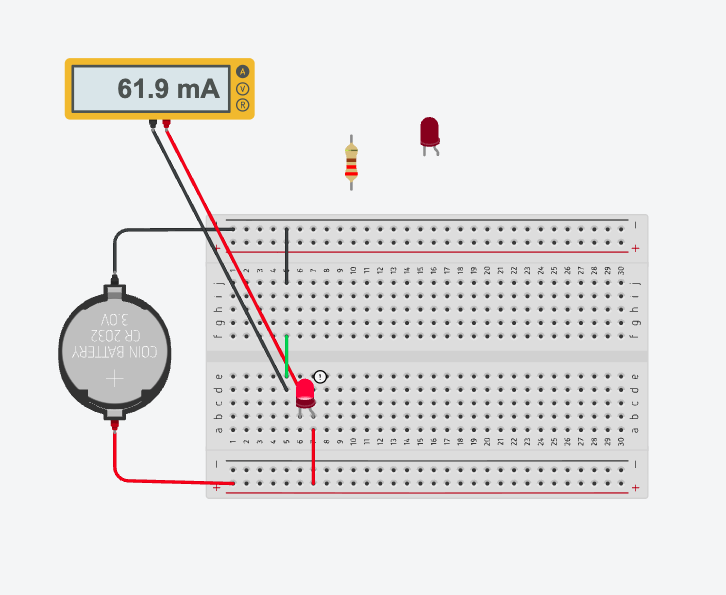 With the resistor removed, the meter reads 61.9 mA, and Tinkercad shows a warning on the LED.
B. LED removed and replaced with a jumper, 220 Ω resistor kept. With the gap bridged, the circuit stays complete and the resistor gets roughly the source’s full terminal voltage. The ideal prediction was 13.64 mA. I read about 13.0 mA. That’s closer, but not an exact match, and I don’t know yet why. Measuring the source’s terminal voltage and checking how much the meter itself affects the reading would be the next steps. If you just pull the LED without bridging the gap, the circuit is open and the current is zero.
At one point I also accidentally wired the current around the LED, so it bypassed the LED entirely. The resistor was still in the loop, so it wasn’t a direct short across the battery. The lesson was to trace the path the current actually takes, not the one I think I built.
Sidebar: The Potato Plot Twist
Before the coin cell, I tried Tinkercad’s potato battery. Its properties said 5 V and 0 Ω internal resistance. The voltmeter connected to the circuit read 1.91 V.
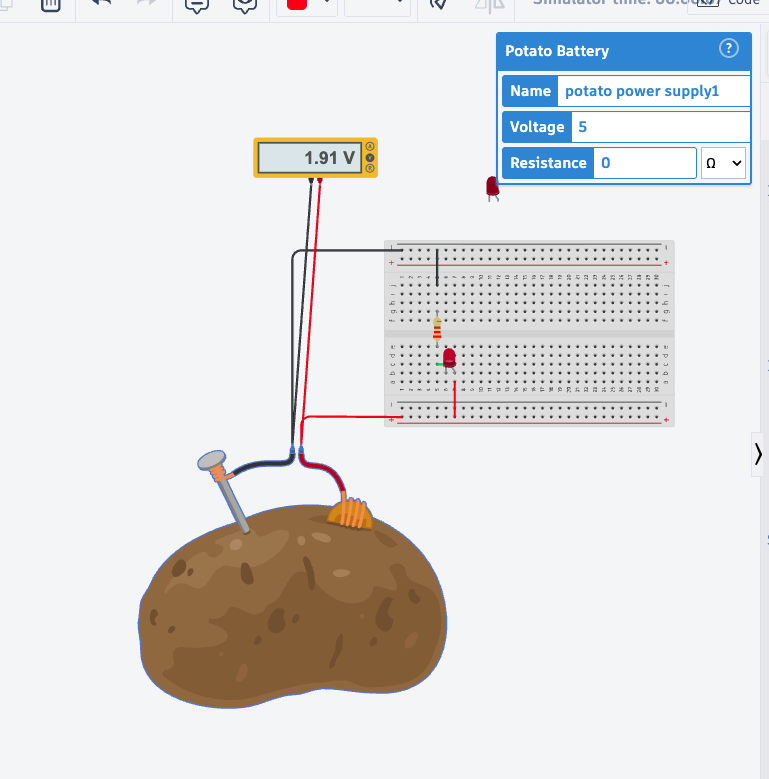 The potato battery is set to 5 V and 0 Ω, but the meter reads 1.91 V.
We never figured out why. I’m not going to call it a simulator bug, hidden resistance, or bad wiring, because I didn’t prove any of those. At one point I blamed a jumper that crossed a power rail, which was wrong. A wire that crosses a rail on screen isn’t electrically connected to it. The real lesson: measure the actual terminal voltage under test conditions, and don’t assume the setting is what gets delivered.
Takeaway
- Use the voltage across the component whose resistance you’re using.
- Measure instead of assuming, whether it’s the battery, the LED’s share, or the potato.
- Check that the circuit is continuous and that the meter is where it needs to be: across a part for volts, in the path for amps.
I started this session frustrated by a number that didn’t make sense. I finished it able to show where the “missing” voltage went and explain it. That’s the kind of foundation I need before moving on to hardware, embedded devices, drones, and eventually hardware security. I’m early in all of that, and nights like this are how I’m building it.